
Exhibitor Guide 2026
V2 Security Copenhagen
6-7 May 2026 | Bella Center, Copenhagen.
Introduction
To achieve the best results, it is essential to prepare your participation well. As the organizer of the exhibition, we would like to offer you some help.
This exhibition guide provides comprehensive information from A to Z for you as an exhibitor at the V2 Security exhibition.
We hope the information will be helpful to you before and during the event, and ask you to read the material thoroughly, so that the exhibition is going to work as well as possible for the benefit of all involved.
If you are unsure about practical issues or require additional information, please feel free to contact us. Our contact information can be found in section 1.1.
Pay special attention to:
- The checklist with all deadlines (Section 3)
- Deadline for ordering of technical services - Friday, March 27th, 2026.
- Time of delivery of goods
- Times of assembly and disassembly of booths
- Admission before, during, and after the exhibition
- Parking before, during, and after the exhibition
Table of contents
- 1. General Information
- 2. Practical Information
- 2.2 Ordering and payment
- 2.3 Complaints
- 2.4 Delivery of goods prior to the exhibition
- 2.5 Pick-up of goods after the fair
- 2.6 Access to Bella Center
- 2.7 Banner and build height
- 2.8 Electricity and Lighting
- 2.9 Mounting and installation of exhibitor’s own material
- 2.10 Floors
- 2.11 Comfort package / Printing of your banner wall
- 2.12 Help building your stand
- 2.13 Co-exhibitors on your stand
- 2.14 Strain on the Roof Construction
- 2.15 Internet connection
- 2.16 Cleaning
- 2.17 Storage and inventory
- 2.18 Waste
- 2.19 Personal items and wardrobe
- 2.20 Toilets
- 2.21 Parking
- 2.22 Café
- 2.23 Serving of food and drinks on stand as merchandise
- 2.24 Fire and emergency exits
- 2.25 Hotels
- 2.26 City
- 3. Checklist for Participation
- 4. Online campaign and catalogue
- 5. Exhibitor portal & leadscanner
1. General Information
1.1 Addresses and contact information
1.1.1 Venue
Bella Center
Center Boulevard 5, B-HALL, 2300 Copenhagen S
Website: https://bellacenter.dk
E-mail: BellaCenterV2@bellacenter.dk
Booth materials are transported to:
Bella Center
Center Boulevard 5, B-HALL, 2300 Copenhagen S
Bigini
Ulrich Jung
E-mail: ulrich@bigini.dk
Tel no: +(45) 28 40 31 17
Website: https://www.bigini.dk/
- For all technical and practical questions regarding the implementation of the exhibition, please contact Bigini.
- For all general questions about the event, including contracts, participants, online, and program, please contact the exhibition team.
1.1.2 Exhibition team
Henrik Bækgaard
Venue Manager / Exhibition / Stand Construction / Exhibitor Services
E-mail: heb@ing.dk
Tel no.: +45 6165 5881
Denice Amalie Mouritzen
Customer Success Manager
E-mail: exhibitor@v2security.dk
Tel no.: +45 2887 4303
Helle Kirk
Senior Consultant
E-mail: hek@ing.dk
Tel no: +45 2333 3030
Lisbeth Dahl Kristensen
Project Manager V2 Security
E-mail: ldk@ing.dk
Tel no.: +45 2194 2299
Helle F. Andersen
Commercial Brand Manager
E-mail: hfa@ing.dk
Tel no: +45 3326 5397
Daniel Bergsagel
Program Director
E-mail: dab@ing.dk
Tel no.: +45 2680 8384
Nicolas Jøns Larsen
Brand Manager V2 Security
E-mail: njl@ing.dk
Tel no.: +45 2065 3707
1.2 Opening hours
1.2.1 Setup
Tuesday, the 5th of May 2026
8 am to 10 pm
Access for exhibitors during the event
Wednesday, the 6th of May 2026
7.30 am to 6 pm
Thursday, the 7th of February 2026
8 am to 10 pm
Please note that exhibitors and booths must be ready at:
8:30 am 6th of May 2026
Access for the participants during the event
Wednesday, the 6th of May 2026
8.30 am to 6 pm
Thursday, the 7th of May 2026
8.30 am to 4 pm
1.2.2 Dismantling
Thursday, the 7th of May 2026
4 pm to 10 pm
Note: Dismantling of booths or removal of exhibited products may not commence before 4 pm when the event is officially finished. Biginis technicians will help with the removal of banners and such. Exhibitors are welcome to borrow ladders for dismantling.
Everything from the booth must be removed during dismantling hours.
For the sake of the event’s overall experience, exhibitors may only dismantle their stands after the fair has closed.
A DKK 5,000 fine will be issued for any stand takedown before 4:00 PM
2. Practical Information
2.1 Production department
Bigini is responsible for setting up stands, lighting, sound, etc.
They will be available during the build-up. If you need advice or assistance, they are available to help.
If you build your own stand and need help, you can order technical assistance from Bigini: https://www.bigini.dk/
Use of external technical equipment must be approved by Bigini´s production department. All instructions from them must be followed. Please contact Ulrich Jung Ulrich@bigini.dk.
2.2 Ordering and payment
For ordering services from Bigini, please use the following link: https://www.bigini.dk/v2-security-koebenhavn/, where you can review the available options.
The deadline for orders is Friday, 27th March 2026.
Payment for all orders is made directly on the Bigini website. If you require additional services during the exhibition, please contact Bigini’s production department.
Please note that a minimum of 30 minutes will be invoiced when ordering technical assistance.
2.3 Complaints
If you have any complaints about deliveries provided by Bigini or the venue we must ask to have them in writing before the exhibition closes. Otherwise, complaints are not accepted.
2.4 Delivery of goods prior to the exhibition
If you need to have packages and goods sent to Bella Center Copenhagen, you have the following options:
- Packages & goods arriving before stand build-up:
As our storage capacity is limited, you should be aware that our forwarder DSV receives and stores your package/goods and will deliver them directly to you on the stand once you arrive. You will be invoiced for this service by DSV. - Packages & goods arriving during stand build-up and event:
Here, you must ensure that couriers are supplied with the correct name of the event, company name, telephone number, and stand number. Additionally, you need to be present on the stand to receive and sign for deliveries. If not, couriers are referred to DSV, which receives and stores your package/goods and delivers them directly to you on the stand.
You will be invoiced for this service by DSV.
DSV Fairs & Events
Exhibitors are welcome to use DSV Fairs & Events for the shipment and delivery of materials and equipment to the exhibition. DSV offers coordinated delivery to the venue, ensuring a smooth and efficient logistics process before move-in.
Receipt of Goods (Advance Warehouse)
Exhibitors’ goods can be delivered to DSV warehouse up to 5 working days before the agreed move-in — i.e. from April 27.
Shipping address:
DSV Fairs & Events
Loading Area E
Emma Gads Vej 11
2300 Copenhagen S
Att.: V2 Security / [Exhibitor name + stand no.]
Delivery to Bella Center
All goods will be transported internally from their warehouse at Bella Center to Hall B at the move-in time on May 5th.
Procedure in brief:
- Exhibitors ship their goods to DSV Fairs & Events (address above)
- The goods are registered and stored at DSV's warehouse at Bella Center
- Consolidated delivery to the hall takes place according to the agreed move-in schedule
- Empty packaging handling can be arranged as needed
Pricing
Prices for receipt, handling, storage, and delivery depend on volume, weight, and any additional services required. Please contact DSV at expo@dk.dsv.com for more information on prices.
It is also possible to bring your own forwarder. Bella Center Copenhagen recommends that your own freight forwarder cooperate with DSV.
For information about additional transport services, logistics services, delivery address, and prices, please contact DSV at expo@dk.dsv.com.
Please note that Bella Center and the organiser are not liable for goods delivered before or during the exhibition. Although the organiser or Bella Center has acknowledged receipt, the goods are at the exhibitor’s own risk. Delivery address, see section 1.1 "Addresses and phone numbers".
2.5 Pick-up of goods after the fair
If the goods are returned by carrier, the pallets/boxes must be repacked and marked with the return address and contact information. Goods must be removed within the dismantling period, Thursday, May 7 2026, between 4 pm and 10 pm.
Other times for pickup must be arranged with the project coordinator from Bella Center (BellaCenterV2@bellacenter.dk), and the possibility depends on the date of the next event in Bella Center.
2.6 Access to Bella Center
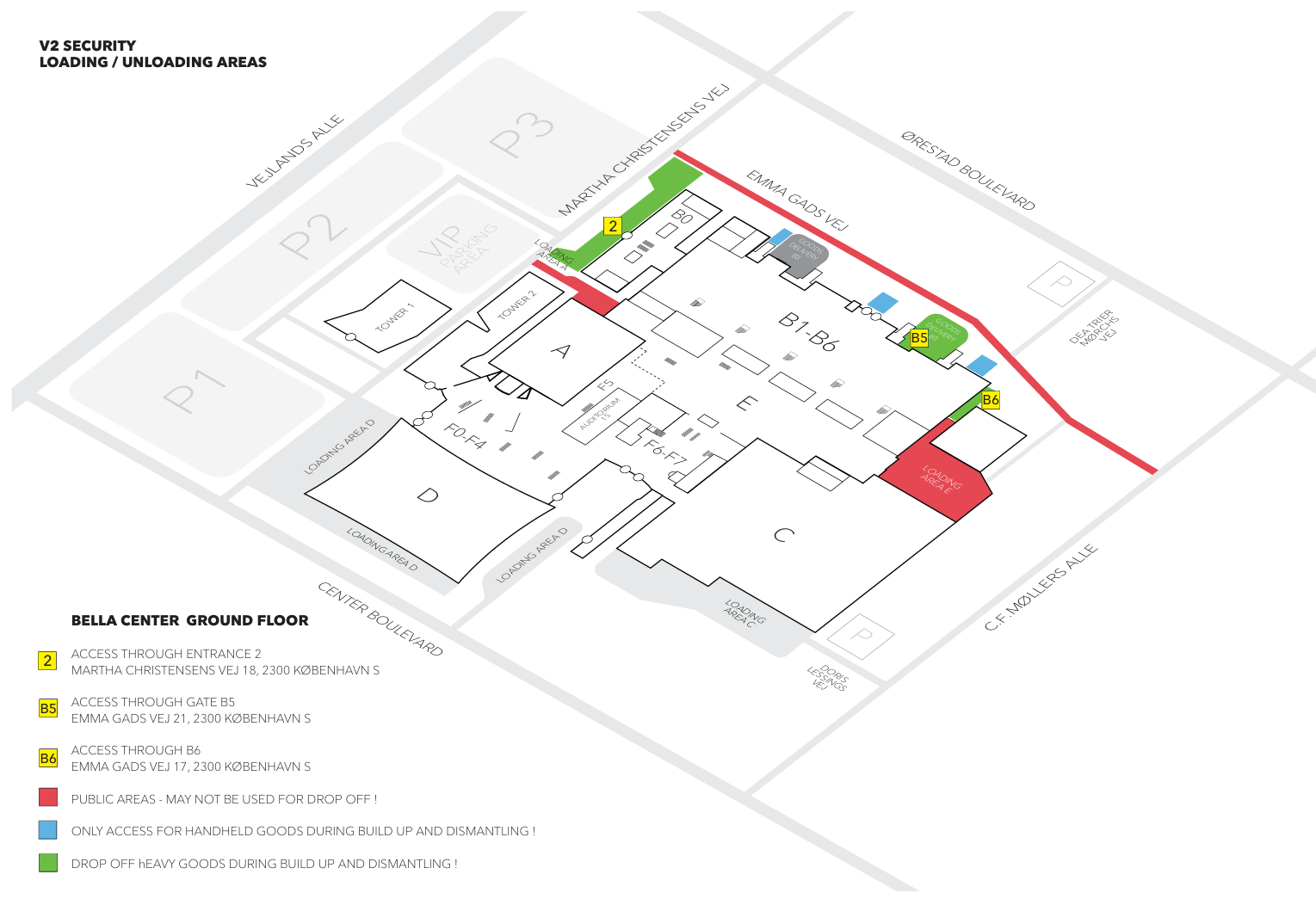
2.7 Banner and build height
It is not permitted to hang banners above your booth. You may build up to 2.5 meters in height.
Logos must not be placed facing neighboring booths, as this could cause confusion for visitors.
All setup and exhibition materials must remain within the booth area during the exhibition, to ensure the overall layout, flow of the exhibition, cleanliness, and emergency exit routes are maintained.
2.8 Electricity and Lighting
Electricity, carpet, and lighting are ordered from Bigini:
https://www.bigini.dk/v2-security-koebenhavn/
Electricity and lightning are included for all booths. Setting up, dismantling, and focusing of light is carried out by Bigini.
2.9 Mounting and installation of exhibitor’s own material
Bigini can help with advice and guidance about mounting materials on the booth. Signs and the like must not hang or protrude onto hallways and open areas.
It is prohibited to damage Bella Center’s floors, walls, roof construction and materials with screws, drills, nails or in any other way.
2.10 Floors
The concrete floors in Bella Center are strong. Exhibitors are requested to avoid damaging the floor and, if necessary, lay a grease and oil-absorbent surface. The production department must be contacted if objects weighing in excess of 750 kg are exhibited. The use of tape TESA no. 4964, TESA Power-Strips, and DuploColl 43102 is permitted, as these can be removed easily without leaving marks/glue residue. On-site, you can purchase DuploColl 43102.
2.11 Comfort package / Printing of your banner wall(s)
Booth includes:
- Back wall with 4-color print
- Side wall with 4-color print (only for booths that have a booth on one of the sides)
- Mullespot lights
- Charcoal carpet 0923
- 1 high table with a white tablecloth
- 2 chrome barstools
- 1 Dragør counter in white with print (print size W:952 H:875 mm)
- Electric plug 230 v with 3 outlets
- Free Wi-Fi
For the printed back wall (and side wall), send the final PDF file at a minimum of 100 DPI in 1:1 scale via WeTransfer to ulrich@bigini.dk with V2 Security and your stand number in the headline of the mail.
Dimensions:
- 9 m2: Back wall W 2910 x H 2500 mm + 20 mm bleed on all 4 sides.
- 12 m2: Back wall W 3895 x H 2500 mm + 20 mm bleed on all 4 sides.
- 18 m2: Back wall W 5865 x H 2500 mm + 20 mm bleed on all 4 sides.
- 24 m2*: Depends on whether your backwall is 6 or 8 meters:
- 6 meters Back wall W 5865 x H 2500 mm + 20 mm bleed on all 4 sides.
- 8 meters Back wall W 7855 x H 2500 mm + 20 mm bleed on all 4 sides.
- Side Wall: W 2910 x H 2500 mm + 20 mm bleed on all four sides. (only for stands that have a stand on one of the sides)
- Front of desk: W 952 x H 875 mm – no bleed
Read more here: https://www.bigini.dk/v2-security-koebenhavn/
*24 m2 stands: If the stand is an island stand, you, as the exhibitor, are responsible for the construction.
If the stand is an end-of-row stand, a mandatory stand construction is included in the package. Consult the floor plan or contact us if you are in doubt.
If you also bring your own logo banners, etc., they must be of non-combustible material or fireproofed.
2.12 Help building your stand
If you need professional help building your stand, you can contact www.bigini.dk.
2.13 Co-exhibitors on your stand
Each exhibitor may invite their partner(s) / suppliers to their exhibition stand at the fair. If a partner wishes to be registered as a separate exhibitor in the exhibitor listing and in all communication to visitors, please book a co-exhibitor package with your sales contact.
The first separate exhibitor is free of charge. For additional co-exhibitors, the price is DKK 11.300,00
A co-exhibitor package includes: A separate listing at the same stand number on the exhibition website, onsite signage during the exhibition, and in any printed communication. In addition, each co-exhibitor will receive their own login and password for access to the event system (coded links and banners, upload whitepapers/case studies, free lead generation).
2.14 Strain on the Roof Construction
Contact Bigini for assistance before mounting heavy objects.
2.15 Internet connection
The free WiFi internet supplied to the building is
Network: BC_guest
Password: No Password
Cabled internet can be ordered in the webshop.
2.16 Cleaning
Bella Center is responsible for cleaning all public areas during the exhibition.
Exhibitors are responsible for cleaning stands, podiums, showcases, etc. If you prefer Bella Center to do the necessary cleaning between days 1 and 2, the service can be ordered here.
There are containers outside the venue.
2.17 Storage and inventory
Storage is possible behind the Main Stage.
Storage is at the exhibitor’s own risk. All goods must be clearly marked with the name of the exhibition, dates, the name of the exhibitor, and stand number. If the goods are not clearly marked, Bella Center cannot store the goods.
Collection of storage should take place during dismantling (Thursday, the 7th of May, between 4 pm and 10 pm). Access to stored goods is possible during the exhibition.
2.18 Waste
Waste Containers are placed outside the Bella Center. Cardboard boxes must be folded. For smaller amounts of waste like plastic cups, napkins, etc., please use the rubbish bins inside Bella Center.
2.19 Personal items and wardrobe
Exhibitors’ bags, coats, and similar personal items are kindly requested to be hidden from the public to ensure a beautiful and orderly impression at the exhibition. There is a staffed wardrobe at the venue.
2.20 Toilets
The main toilets are behind Theaters 5 & 6, and Theaters 9 & 10.
2.21 Parking
There are several parking facilities around Bella Center. Parking Royal is the most affordable option, but it is a 10-minute walk away.
Find more information here.
2.22 Café
The café is open during exhibition hours. If you want to pre-order lunch and all-day coffee for you and your personnel, please do it through the following link: Cafe under the tab ‘Catering’.
Buffet with hot items:
11:30 to 13:30 + 1 water in an adjacent area, DKK 230 per day.
2.23 Serving of food and drinks on a stand as merchandise
It is emphasized that food and drinks are served at the booth. Catering can be ordered via Bella Center – order via email BellaCenterV2@bellacenter.dk.
If the exhibitor wants to bring Coffee TUC TUC, logo water, food, drinks, or similar, there will be a waiver fee of DKK 1.500 ex VAT per day - it can be ordered in the webshop here – please select the item “Servering af mad/drikke på standen” and add it to your order.
Exhibitors are welcome to hand out treats such as sweets, nuts or similar small delicacies.
2.24 Fire and emergency exits
The following practical regulations must be observed at all times:
- Fire and emergency exits must not be obstructed without the permission of the production department.
- Smoke, steam, or fumes must not be generated.
- All inflammable material erected in the hall must be fireproofed
- Roof constructions on the booth are only allowed if approved by the production department
- Use of an open fire must be approved by Bella Center
- Coffee-makers, electric kettles, etc. in backrooms require a CO2 fire extinguisher, min. 5 kg.
2.25 Hotels
Bella Sky Hotel is in the same building as the venue. We are pleased to offer you 10% discount using this booking link.
Please note that the discount is only usable for the period of May 4th-8th.
The discount code applies as long as rooms are available.
2.26 City
Transport time from the Metro station to Bella Center:
5-minute walk.
Transport time from the airport to Bella Center
Taxi: approx. 10 min.
Public transportation - Metro: approx. 10 min.
3. Checklist for Participation
| To do | Deadline | Details |
|---|---|---|
| 1. Watch the kick-off video | - | Kick off 2026 |
| 2. View the exhibitor website for all relevant information and links regarding your preparation | - |
N.B. You need to be logged in to see the page. See #4 for how to create a login. Go to v2security.dk > log in > go to your exhibitor portal at the navigation bar |
| 3. Fill in your online campaign and catalogue and upload | March 5th 2026 | Sign up here |
|
4. Invite prospects and clients with your personal registration link VIP: |
March 9th 2026 until May 7th 2026 March 9th – April 7th |
Link is visible on your exhibitor portal from March 2nd. |
| 5. Promote your participation on your own website with the available banners | March 9th 2026 until May 7th 2026 |
Marketing Kit will be available on the website > Marketing Kit |
| 6. Follow your registrations | March 9th 2026 until May 7th 2026 |
Go to v2security.dk > log in > go to your exhibitor portal at the navigation bar |
| 7. If you have your own stand, hand in the design for approval. This is optional, but beware that some stands have a pillar inside the stand. Also beware that the height of your stand cannot exceed 2,50 meters. | View Mounting and installation of exhibitor’s own material | |
| 8. Printed wall for standard booth – High-Res PDF file – min. 100 DPI including booth number | March 27th 2026 | Bigini webshop |
| 9. Order technical services | March 27th 2026 | Through Bigini webshop |
| 10. Order catering for your stand. | March 27th 2026 | Order via Bigini webshop |
| 11. Delivery of goods prior to the exhibition (when necessary) | May 5th 2026 | See Delivery of goods prior to the exhibition |
| 12. Download your stand scans | From May 6th 2026 | Go to v2security.dk > log in > go to your exhibitor portal at the navigation bar |
| 13. Start with the follow-up of your leads | From May 6th 2026 | See instructions above |
| 14. Download your online leads | Until August 7th 2026 |
Go to v2security.dk > log in > go to your exhibitor portal at the navigation bar Note: The leads will be deleted after August 7th with no possibility of restoring them. |
4. Online campaign and catalogue
Our website is the tool to set up your online campaign for V2 Security.
The website enables you to efficiently generate online exposure and leads through content marketing - before, during, and after the event.
Everyone who registers as a visitor for the event gets access to an exhibition page where they can prepare their visit. They can read company profiles and download content (whitepapers, reference cases, business cases, etc.). You can make this information and content available to visitors through your registration at the website.
As an exhibitor, you will have access to all available contact details of people who downloaded your content, to turn these potential customers into valuable prospects: the perfect form of online lead generation and an extension of your offline participation.
4.1 Create your online campaign
Your online campaign includes three components:
- Exposure
- Lead generation
- Active matching with pre-registered visitors
You can organise and set up your own online campaign through our website. You can do so by registering here.
Here you can fill in or edit the requested information. This includes: address, logo, profile text(s), links, and content (whitepapers, reference cases, videos, etc.).
4.2 Guided tours
The possibilities regarding the guided tours are as follows:
We offer five guided tours each day, each focusing on one of the following topics:
- When the Attack Happens – Detecting and Responding to Modern Cyber Threats
Cyber attacks are no longer a question of if, but when. This guided tour explores how organisations detect threats early, respond effectively, and limit damage using modern security technologies and real-world experience. - Securing Cloud and Hybrid IT – Control Without Slowing the Business
Cloud, SaaS, and hybrid IT enable speed and flexibility, but also introduce new security challenges. This tour focuses on how organisations protect data, maintain visibility, and stay compliant in a cloud-first world. - People and Identity – The Most Critical Factor in Cybersecurity
Most cyber attacks start with people and identities. This tour highlights how access control, identity management, and security awareness reduce risk and strengthen security across the organisation. - Compliance, NIS2 and Risk Management – Turning Requirements into Business Value
Regulation and compliance play a growing role in cybersecurity. This tour shows how organisations work with NIS2, risk management, and governance in a structured and practical way—without losing focus on the business. - Industrial Security
Cybersecurity is not only about threats and regulations—it is also about stable operations and visibility. This tour focuses on secure IT and OT operations, infrastructure, and the practical challenges of keeping systems running safely and reliably.
The guided tour hosts 5 to 30 participants, with up to three groups running simultaneously. If more than three people are on the waiting list and another tour is cancelled, we may add one or two extra tours.
The registrations for the tours are reviewed two weeks before the event. If participation is too low, the tour will be cancelled. To ensure flexibility, guided tours are only invoiced after the event.
For further information about the guided tours, please contact your sales representative.
4.3 Contact
For questions and/or comments, please contact our customer success team on exhibitor@v2security.dk.
5. Exhibitor portal & leadscanner
You can find all practical information about the expo in your exhibitor portal, including your invitation link, marketing kit, the order form and so on.
You will gain access to the portal via our website once you have registered for the event. Here, you can also find contact details, read about our VIP program, and much more.
If you have not registered yet, please do so through this link.
Please note that only the person who registered your company has access to the exhibitor portal. All communication regarding your online participation is handled via exhibitor@v2security.dk.
From the exhibitor portal, you will find your personal invitation link.
Please use this link for all marketing purposes.
Through the exhibitor portal, you can also register your stand personnel. Be aware of the number of staff at your booth; too many can be discouraging for attendees to approach your booth.
5.1 Your Visitors
Through your exhibitor portal, you can access your lead lists, which show the number of visitors who have registered using your company’s personal invitation link or signed up for your sessions.
Please note that the exhibitor portal is created only after your company has been registered through the link above, and access to lead lists will therefore be available thereafter.
The organisation keeps an exact track of which invitation numbers you have received. When a visitor registers through your invitation link, the visitor is added to your lead list, and they have the possibility to be selected as a VIP.
With this data, you can make appointments and plan ahead. If you have made an appointment with a visitor, the chance that this visitor will actually visit your booth increases dramatically!
5.2 Invitation link
Your personal invitation link has a special tag in it, which tracks all visitors registered via your link. The data of those visitors is directly available in your lead list. Find them at the exhibitor portal.
The only thing you have to do is add the link you have received and add it anywhere you are promoting your participation at the event.
Ideas for marketing:
- Email invitations
- Your website
- Other marketing channels
5.3 VIP’s
The VIP Program is a tool that allows you, as an exhibitor, to invite your most important customers and contacts and offer them access to a special VIP status.
The program is designed to strengthen relationships with your key customers and ensure more qualified and value-creating meetings during the event. At the same time, the selection process ensures that the VIP Program consists of relevant decision-makers and end-users.
The VIP Program is structured as follows:
- You invite relevant contacts using your personal registration link
- The organiserorganisations selects VIPs based on defined criteria
- Your selected customers receive a personal VIP invitation on your behalf
5.3.1 How the VIP Program works
Step 1 – Invitation: You invite your customers and contacts via your personal registration link during the period March 9 – April 10.
You may continue to invite contacts after April 10; however, these contacts will not be eligible for the VIP Program.
Step 2 – VIP selection: On April 16, you will receive a complete list of the selected VIPs based on the VIP criteria.
You will have until April 21 at 3:00 PM to review the selection and provide feedback.
Step 3 – VIP confirmation: No later than April 24, the organiser will send a personal VIP entrance badge to your VIPs on your behalf.
VIP advantages
- Fast-track entrance
- Fast-track to sessions
- VIP lounge
- Complimentary lunch & other refreshments
- Exclusive morning event with breakfast on May 6th
5.3.2 VIP Criteria
To be selected as a VIP, the individual must be either a:
- Decision-maker, or
- End-user
Eligible for the VIP Program:
- IT Managers
- IT Specialists
- Security Officers
- Storage Managers
- Administrators / IT Administrators
Not eligible for the VIP Program:
- IT suppliers (manufacturers, resellers, or distributors)
- Roles within sales or marketing
- Teachers and students
These groups are excluded to ensure the VIP Program remains focused on end-users and decision-makers, creating maximum value for both exhibitors and participants.
5.4 Exhibitors Badges/Work passes
The exhibitor badges are valid during the buildup/breakdown period as well as during the show. Exhibitor badges are free of charge. They will become available at your profile page as the event approaches. Be aware that you have to print the badges yourself in colors.
5.5 Lead Scanning tool
During the exhibition, you can make use of a lead scanner tool to efficiently collect lead data from the visitors of your stand.
With the Lead scanning tool, you can scan visitor badges with your own smartphone or tablet. For this purpose, all visitors' badges have a QR code.
Please find the guide for the lead scanning tool on your exhibitor portal at the website
All your leads will be available in the system when there is an internet connection. Here, you can browse your leads and export PDF or csv files.